
Hexo+Next美化步骤
发表于
更新于
本文字数:
3.9k
阅读时长 ≈
4 分钟
切换中文
- hexo/_config.yml中language改为zh-CN,注意主题版本
添加心形箭头
- 具体步骤如下:
在/themes/next/source/js/src下新建文件 clicklove.js ,接着把下面的代码拷贝粘贴到 clicklove.js 文件中:1
!function(e,t,a){function n(){c(".heart{width: 10px;height: 10px;position: fixed;background: #f00;transform: rotate(45deg);-webkit-transform: rotate(45deg);-moz-transform: rotate(45deg);}.heart:after,.heart:before{content: '';width: inherit;height: inherit;background: inherit;border-radius: 50%;-webkit-border-radius: 50%;-moz-border-radius: 50%;position: fixed;}.heart:after{top: -5px;}.heart:before{left: -5px;}"),o(),r()}function r(){for(var e=0;e<d.length;e++)d[e].alpha<=0?(t.body.removeChild(d[e].el),d.splice(e,1)):(d[e].y--,d[e].scale+=.004,d[e].alpha-=.013,d[e].el.style.cssText="left:"+d[e].x+"px;top:"+d[e].y+"px;opacity:"+d[e].alpha+";transform:scale("+d[e].scale+","+d[e].scale+") rotate(45deg);background:"+d[e].color+";z-index:99999");requestAnimationFrame(r)}function o(){var t="function"==typeof e.onclick&&e.onclick;e.onclick=function(e){t&&t(),i(e)}}function i(e){var a=t.createElement("div");a.className="heart",d.push({el:a,x:e.clientX-5,y:e.clientY-5,scale:1,alpha:1,color:s()}),t.body.appendChild(a)}function c(e){var a=t.createElement("style");a.type="text/css";try{a.appendChild(t.createTextNode(e))}catch(t){a.styleSheet.cssText=e}t.getElementsByTagName("head")[0].appendChild(a)}function s(){return"rgb("+~~(255*Math.random())+","+~~(255*Math.random())+","+~~(255*Math.random())+")"}var d=[];e.requestAnimationFrame=function(){return e.requestAnimationFrame||e.webkitRequestAnimationFrame||e.mozRequestAnimationFrame||e.oRequestAnimationFrame||e.msRequestAnimationFrame||function(e){setTimeout(e,1e3/60)}}(),n()}(window,document);
- 在\themes\next\layout_layout.swig文件末尾添加:
1
2
<!-- 页面点击小红心 -->
<script type="text/javascript" src="/js/src/clicklove.js"></script>
文章结束标志
- 在路径 \themes\next\layout_macro 中新建 passage-end-tag.swig 文件,并添加以下内容:接着打开\themes\next\layout_macro\post.swig文件,在post-body 之后(END POST BODY), post-footer 之前添加如代码:
1
2
3
4
5
<div>
{% if not is_index %}
<div style="text-align:center;color: #ccc;font-size:14px;">-------------本文结束<i class="fa fa-paw"></i>感谢您的阅读-------------</div>
{% endif %}
</div>然后打开主题配置文件(_config.yml),在末尾添加:1
2
3
4
5<div>
{% if not is_index %}
{% include 'passage-end-tag.swig' %}
{% endif %}
</div>1
2
3# 文章末尾添加“本文结束”标记,此项在7.5版本验证失效
passage_end_tag:
enabled: true
添加字数,阅读时间
- 安装hexo-symbols-count-time如果安装完报如下提醒,还需安装eslint
1
$ npm install hexo-symbols-count-time --save
1
2D:\hexo\blog>npm install hexo-symbols-count-time --save
npm WARN babel-eslint@10.0.1 requires a peer of eslint@>= 4.12.1 but none is installed. You must install peer dependencies yourself. - 安装eslint在站点配置文件添加如下配置
1
$ npm install eslint --save
在NexT主题配置文件添加如下配置(NexT主题已支持该插件,有的话无需再添加)1
2
3
4
5
6symbols_count_time:
symbols: true # 文章字数统计
time: true # 文章阅读时长
total_symbols: true # 站点总字数统计
total_time: true # 站点总阅读时长
exclude_codeblock: false # 排除代码字数统计1
2
3
4
5
6
7
8
9# Post wordcount display settings
# Dependencies: https://github.com/theme-next/hexo-symbols-count-time
symbols_count_time:
separated_meta: true # 是否另起一行(true的话不和发表时间等同一行)
item_text_post: true # 首页文章统计数量前是否显示文字描述(本文字数、阅读时长)
item_text_total: false # 页面底部统计数量前是否显示文字描述(站点总字数、站点阅读时长)
awl: 4 # Average Word Length
wpm: 275 # Words Per Minute(每分钟阅读词数)
suffix: mins.
首页只显示预览
- 修改themes/next-reload/_config.yml中
1
2
3
4
5# Automatically Excerpt. Not recommand.
# Please use <!-- more --> in the post to control excerpt accurately.
auto_excerpt:
enable: false
length: 150
禁用页底hexo有关的信息
- 打开主题的配置文件_config.yml
footer下关闭powered下enable和theme的enable
关闭/卸载windows10安全中心及Windows Denfender方法,亲测有效
发表于
更新于
本文字数:
238
阅读时长 ≈
1 分钟
nginx安装https模块
发表于
更新于
本文字数:
2k
阅读时长 ≈
2 分钟
目标:nginx配置多个https域名
查看nginx是否支持支持TLS协议的SNI扩展
1 | root@iZj6cgoyl5x6opizfwaukrZ:~# /usr/local/nginx/sbin/nginx -V |
如果出现上面的TLS SNI support enabled,则略过第一步
更新nginx
1 | [root]# wget http://nginx.org/download/nginx-1.12.0.tar.gz |
其中openssl一般系统自带,可不添加
命令实行后建议,备份nginx.conf,进行重新安装,即make install
增加nginx的配置
直接增加server级的ssl配置即可
今天早上想给自己的服务器添加ssl证书,上传证书,配置证书后发现nginx没有配置ssl_module,只好自行添加了
1 | root@instance-0vy61lkh:/maxec/runtime/installer/nginx-1.14.2# nginx -s reload |
首先,需要重新编译源码
1 | root@instance-0vy61lkh:/maxec/runtime/installer/nginx-1.14.2# cd |
这一步千万不能 make install ;不然会把之前已经安装的nginx 覆盖掉
除非你已经备份了配置文件
如果中间发现缺少openssl库,可通过以下命令安装
1 | sudo apt-get install openssl |
现在,检查我们的安装是否生效
1 | root@instance-0vy61lkh:/usr/local/nginx# /usr/local/nginx/sbin/nginx -V |
一个免费SSL引发的血案
发表于
更新于
本文字数:
315
阅读时长 ≈
1 分钟
问题
- 今天打开自己的博客,发现二次打开时会被断开连接
碰到这个问题第一时间觉的是nginx的ssl配置有问题 - 随即开始对nginx的ssl进行调整,无论调整keepalive-timout
ciphers,都没有效果,随即测试到底多久能再次打开 - 经过测试,发现没有180s能够再次打开,然后查找有关180s的nginx配置
发现有个proxy_timeout默认为180s,修改后无效,挠头了 - 然后考虑是dns转换问题,使用地址访问后,每次都可以进入,然后用ping命令
结果每次地址解析都正确,证明dns解析正常 - 最后,发觉只能是ssl的问题,因为配置没问题,nginx没问题,最后屏蔽ssl配置后
取消跳转,问题解决,看来便宜的ssl还是不行啊…
Android端RSA加密,后端无法解密的情况
2019-10-31 20:11
做BOC支付时,需要对文件进行RSA签名
但是正确的数据,正确的bytes,正确的秘钥
却始终无法得到正确的结果
使用的是给出的RSA工具,其中java环境运行良好,代码如下
1 | /** |
其中cache = cipher.doFinal(data, offSet, inputLen - offSet);
返回数据错误
多方查证cipher的正确初始化方法为Cipher cipher = Cipher.getInstance(“RSA/ECB/PKCS1Padding”);
MySQL查询和修改auto_increment的方法
发表于
更新于
本文字数:
304
阅读时长 ≈
1 分钟
本文实例讲述了MySQL查询和修改auto_increment的方法。分享给大家供大家参考。具体如下:
查询表名为tableName的auto_increment值:
1 | SELECT AUTO_INCREMENT FROM information_schema.tables WHERE table_name="tableName"; |
修改表名为tableName的auto_increment值:
ALTER TABLE tableName auto_increment=number ;
希望本文所述对大家的MySQL程序设计有所帮助。
https://www.jb51.net/article/60948.htm
Android Studio 3.5格式化布局代码时错位、错乱bug
发表于
更新于
本文字数:
97
阅读时长 ≈
1 分钟
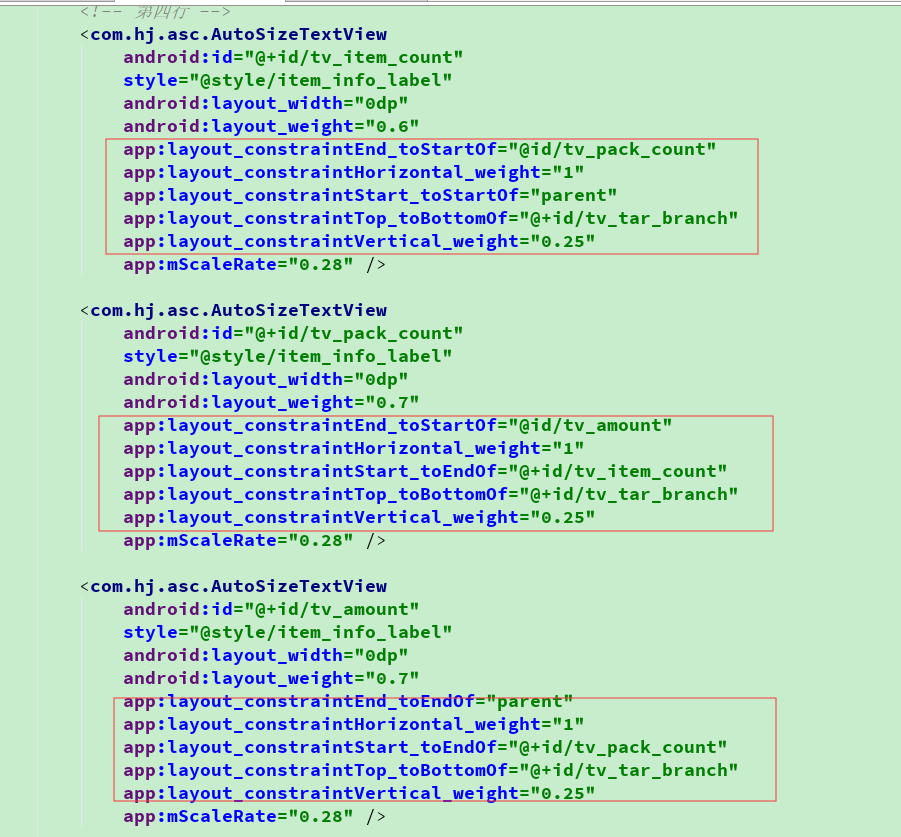
更新到3.5版本后,格式化布局文件代码,会自动给排序元素,导致界面布局错乱
解决办法:在布局文件界面按住ctrl+alt+shift+L快捷键,弹出下面的框,取消勾选Rearrange code即可
AS(Idea)打开java,内容错误
发表于
更新于
本文字数:
88
阅读时长 ≈
1 分钟
记一次痛苦的调试
发表于
本文字数:
86
阅读时长 ≈
1 分钟
com.alibaba.fastjson.JSONException: syntax error, expect }, actual ,
这种是因为没有对报文中null进行泛型转换导致的